Month: April 2018

  • The Best VR Headset for Your Budget

    The Best VR Headset for Your Budget

    Last week, Apple announced its plans to launch a wireless headset that includes both VR and AR technology. Unfortunately, you’ll have to wait until at least 2020 to get your hands on one. In the meantime, here are our top 5 VR headsets for a range of budgets and platforms.

    Tethered Versus Mobile Headsets

    VR headsets come in two flavors—tethered and mobile. As you can see below, tethered headsets cost significantly more than mobile headsets, but they also offer a much more advanced VR experience. Both types of headset require additional handheld controllers to interact with the virtual environment.

    Mobile headsets are designed to literally place your phone inside a box that you strap over your eyes. The lenses create separate images, one for each eye, giving you a sense of 3D space. Tethered headsets need to be connected to a separate computer. What you lose in flexibility, you gain in video quality, processing speed, and range of games with tethered tech.

    HTC Vive Pro ($799)

    There’s a reason the Vive series of tethered headsets is the most expensive on the market. The original Vive and the new Pro model have better specs than any of their competitors, but that may not be a big selling point to entry-level consumers, especially since you’ll also need a top-of-the-line PC to pair with the Vive Pro.

    One thing the Vive series does better than anyone else is room tracking. Their Lighthouse technology lets you move around with the headset on—a plus for a more immersive gaming experience—although you will still be connected by a cable to your computer. There are a decent number of titles that will work with the Vive Pro. In addition, HTC offers a subscription service called Viveport that includes giveaways, exclusive bonuses, and the ability to try out different games.

    Oculus Rift ($399)

    If you’re at all interested in VR, then chances are good you’ve already heard of the Oculus Rift. The biggest name in virtual reality also comes with the best, easiest to use controllers and the largest catalogue of games. The recent price drop also makes it more affordable, but like the Vive Pro, you’ll still need a powerful PC.

    The technology, originally funded by a Kickstarter campaign and then acquired by Facebook for around $2 billion, has improved since the earliest model of the Oculus Rift, but some users report issues with the built-in headphones and cite the precise positioning required for the headset to be frustrating. Still, it’s our choice for a mid-range PC headset.

    Sony PlayStation VR ($299)

    What if you don’t have a high-powered gaming PC but still want to dive into virtual reality? The Sony PlayStation VR headset is here for you. A hundred dollars cheaper than the Oculus Rift, the PSVR only requires—you guessed it—a PS4 to work. That’s a much smaller total investment if you’re just getting started.

    Plenty of people found the PSVR’s balance of quality and affordability to be right on the mark. Sony has sold more than 2 million of the headsets, outstripping the competition. It might not be the best possible VR experience, but this headset is a fun and novel way to interact with your PlayStation.

    Samsung Gear VR ($130)

    Let’s leave the realm of tethered headsets behind and check out the Samsung Gear VR. At less than half the price of the Sony PlayStation VR, Samsung’s mobile headset works with a range of Galaxy smartphones. If you’re looking to upgrade soon, Samsung frequently bundles the Gear VR with their newest phones.

    The mobile headset supports 360-degree video as well as a variety of apps and games. It is packaged with a Bluetooth controller to allow you to navigate the virtual world. Given that Oculus helped build the software, it’s no surprise that the Gear VR offers the best mobile virtual reality headset on the market today.

    Google Daydream View ($99)

    When Google announced the “Cardboard” VR headset in 2014, people couldn’t tell if it was a real product or a joke. The newest model of their Daydream View headset is streamlined, surprisingly comfortable, and a bargain at $100.

    The biggest advantage of this headset is that it will work with most smartphones, not just Google’s own Pixel. Keep in mind, however, that your experience will be limited by how well your phone can keep up. The new Daydream View has a full 100-degree field of view (an improvement over the previous model’s 90 degrees) and a simple 2-button controller.


  • LG Teases the Loudest Smartphone Ever

    LG Teases the Loudest Smartphone Ever

    LG’s new G7 ThinQ features a “Boombox Speaker” that promises to be 10 times louder than the competition. LG hopes their innovative speaker technology, combined with a super-bright display, will draw customers away from Apple and Samsung.

    How Loud Is It?

    The Korean manufacturer claimed that the speaker “increases the base sound level by more than 6dB.” The Boombox Speaker technology appears to use the body of the phone itself as a resonance chamber. This updated approach allows LG to pack more sound output into a small space compared to conventional speakers.

    Unfortunately, that also means when your ringtone goes off at an inconvenient time—such as in the middle of a meeting or at the movie theater—it’ll be 10 times louder than anyone else’s phone.

    All About That Bass

    Bass lovers, rejoice! The new LG phone has twice the amount of bass compared to the average smartphone currently on the market. And if you place the G7 ThinQ on a flat surface made of wood or metal, you’ll get even more bass amplification as the surface essentially becomes a woofer.

    3D Sound Output

    The LG G7 ThinQ will also be the first phone to feature DTS:X support for headphone users, allowing you to enjoy 3D surround sound effects on par with a movie theater equipped with 7.1-channel speakers. Combined with the Hi-Fi Quad DAC (digital-to-analogue converter) to reduce distortion to imperceptible levels, this phone should be an audiophile’s dream.

    LG will launch its latest phone on May 2 in the US. We’ll find out then if the Boombox Speaker is all it’s cracked up to be.

  • New Smart Wall for Smart Homes

    New Smart Wall for Smart Homes

    Smart homes are getting smarter and smarter. The Wall++ offers a new way to control smart homes, one that doesn’t involve repeating phrases to a smart speaker.

    Wall++

    The Wall++ was developed by researchers at Carnegie Mellon University and Disney Research. They created a way to make the walls of a smart home into gesture-sensing touchpads. They used conductive paint and a custom sensor board to create electrodes to turn walls into an “electromagnetic sensor to detect and track electrical devices and appliances.”

    What’s so great about a smart wall? Researchers say the wall system could monitor activity in rooms, send alerts when an appliance goes off, adjust lights, and control televisions. It can also track people who are wearing certain electronic devices that emit an electromagnetic signature.

    The Wall++ is an idea that built off of Carnegie Mellon’s previous work in a system called Electrick. Electrick took the first step in spraying conductive paint onto smooth surfaces to enable touch controls.

    Smart Wall Could Replace Smart Speaker Systems

    Home smart speakers are popular, but Carnegie Mellon researchers predict the smart wall could be an improvement and become more popular.

    It will be some time before the Wall++ is available to the public, however. Researchers are currently installing prototypes by putting a sensor board in the wall’s baseboard, but they think they can make improvements for easier installation. They also have aims to optimize the Wall++’s energy consumption. Overall, the Wall++ is looking to be extremely promising for the future of smart homes.

  • Sprint Plans to Merge with T-Mobile

    Sprint Plans to Merge with T-Mobile

    Two major wireless carriers in the United States are about to merge into one company. The combined company will be called T-Mobile and will be based in Bellevue, Washington. The current T-Mobile CEO John Legere will run the company, and T-Mobile’s current COO Mike Sievert will be the new company’s COO and President.

    Merger Plans to Lower Prices

    By combining into one company, Sprint and T-Mobile believe they will be able to lower their prices. They also hope they will be able to pursue overtaking their competition, AT&T and Verizon.

    T-Mobile and Sprint have been in talks for quite some time. Sprint originally broached the idea of buying T-Mobile back in 2014, but nothing came of their proposal. Talks between the two companies resumed, however, in May of 2017.

    Both Sprint and T-Mobile batted the ball back and forth on which company would buy which. Sprint’s offer was tabled in October 2017, followed by an offer by T-Mobile that failed in November 2017.

    But it looks like Sprint and T-Mobile have finally come to a decision. CNBC said that the two companies were closing in on a merger on Friday. The merger is worth $26 billion.

    Deutsche Telekom, T-Mobile’s majority owner, will hold a 42 percent stake in the new company, and Sprint majority owner SoftBank will hold 27 percent. Public stakeholders will hold the rest. Sprint CEO Marcelo Claire and SoftBank SEO Masayoshi Son will sit on the new company’s board.

    This merger comes in an opportune time when T-Mobile and Sprint are ready to send out their new 5G network across the U.S. The new company will serve almost 100 million customers.

  • Snapchat Spectacles V2 May Be the Wearable Tech You’ve Been Looking For

    Snapchat Spectacles V2 May Be the Wearable Tech You’ve Been Looking For

    On Friday, Snapchat debuted their new (and improved) Spectacles, a pair of sunglasses with built-in recording equipment. The glasses are a huge improvement over the first generation of Spectacles, which ended up being disappointing both to consumers and the social media company. But can Snapchat finally break the Google Glass curse with Spectacles V2?

    Improved Features

    The most immediately noticeable improvement over the V1 model is the design. Larger but lighter, the new Spectacles come in black, ruby, or blue frames with a variety of lens options, including prescription lenses with partner Lensabl. The new model also ditches the goofy-looking yellow circle around the camera, replacing it with a more subtle ring that lights up when you start recording.

    Spectacles record video and take photos in HD, and it’s much easier now to upload them to your phone. Using a Bluetooth connection, the syncing process is roughly 4 times faster than the first generation of Spectacles. Based on feedback from customers, Snapchat has also upgraded the new model to record underwater—although users probably shouldn’t try snorkeling with them. Save that for your GoPro.

    Streamlined Sales

    Snapchat claims that one of the reasons sales weren’t as robust as predicted for the V1 model was because they were available through too many retailers. This time, instead of elaborate vending machines, Snapchat is only selling Spectacles through their app. The company had to take a massive loss due to unsold units of the V1; although more than 200,000 people bought a pair of the glasses, Snapchat seriously overestimated the demand.

    Better Content

    Snapchat hopes to hold on to its user base and lure in new customers with Spectacles. The struggling company has lost ground to Instagram and other social media platforms. With the launch of the updated glasses, Snapchat is wisely reaching out to popular users and professional photographers to generate top-quality content. Most customers who purchased the V1 model ended up no longer using the glasses after about a month, so Snapchat needs to prove that these are more than just a novelty.

    Privacy Concerns

    One possible downside to the updated design of Spectacles V2 is that they look more like regular sunglasses. People like to know that they’re being photographed or recorded, and with a stealthy HD camera poised to capture images anytime, anywhere, you may not realize that the Spectacles are recording. We’ll see how—or if—Snapchat addresses these concerns in the future.

  • 10 Ridiculous Gadgets That Someone Actually Thought People Would Buy

    10 Ridiculous Gadgets That Someone Actually Thought People Would Buy

    The wheel. The light bulb. The Hot Pocket.

    History is marked by milestone inventions that revolutionized the way we live…but it’s also littered with bizarre devices, ludicrous patents, and as-seen-on-TV garbage. We’ve trawled the deepest, most shameful archives of regrettable ideas to bring you the 10 weirdest gadgets of all time.
     
    [adPH1]  

    10. The Selfie Toaster

    10-selfie-toaster

    Image credit: Time

    Do you literally have money to burn? Are you a desperate narcissist who needs to be the center of everything—even breakfast? Then have we got the perfect gift for you!

    The Selfie Toaster costs $75, and it clearly does not work. The gadget requires a custom laser-cut metal grilling plate, which you’ll get in the mail after sending the company a photo of yourself. Not only does the toast pictured look nothing like the example photo, but you can also easily imagine how bad it tastes: burnt in some patches, raw in others. We have so many questions. Are you supposed to serve toast stamped with a ghostly, nightmarish version of your face to friends and family? Or is this for lonely, late-night tea parties for people with more money than common sense? At least it comes with a removable crumb tray.
     
    [adTextOnly]

  • Beau’s Number 1 App Reveiw: Love Balls

    Beau’s Number 1 App Reveiw: Love Balls

    Beau’s App series. Each week, I install whatever is the No. 1 bestselling app on the iOS or Android store and review it, to save you the effort in case it’s total waste of life. This week a game called Love Balls, calm down. Its a game that has you drawing lines to make balls touch and fall in love. Ok that sounds worse when i read it back. Love Balls is in the top spot and Im taking it on. How did it get to No. 1? Because it’s free, because it just came out for phones, and because they advertise this game on all social media networks and all you sheep just download it because you don’t want to be the only ones that didn’t in case its the next Pokemon go or candy crush.

    Hows it Rated

    Very Poorly, its a cheap, mind numbingly simple game that helps you time travel through monotonous parts of your day. The game is simple, use your brain and find a way to bump the balls. draw lines or shapes to bump the balls, use minimum amounts of  wisdom and imagination. Yes I played it, 3 and half days dissapeared from my life and I missed the premier of super troopers 2. Not really I was done with this app and review in 20 mins.


    But The Ads

    The biggest reason why this game is a waste of life is the ads. Like all free and cheaply designed app games to distract the masses are its packed with 30 seconds of ads for every 15 seconds of game play. They design  the ads to insist on finishing with no option to exit out, and if you leave the game they just pause that ads untile your patients level returns and you open the game again.


    The Final Thought

    Just pass, next week app will be better I hope. Also as a side note if you google love balls make sure you also add the word app, just trust me.


  • Tablet Talk: ThinkPad X1 Carbon

    Tablet Talk: ThinkPad X1 Carbon

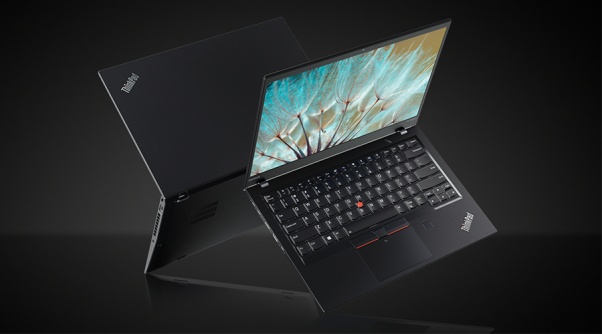
    Tablets are the mash of our technology dependence theses days. They are big phones or weak laptops or any combination of the two. They can be big, they can be powerful, They can be an all in one device or just a side gadget. In all future set movies or media the tablet is a main stream tool, they call them data pads or data cards, but no one uses a keyboard in the future. This being said there are a lot of tablets with many options to navigate through so Im going to break them down in an easy to read guide to help you find the tablet match of your dreams. Today we are going to talk about the Lenovo ThinkPad X1 Carbon.


    The Great

    • Beautiful, vivid display
    • Strong performance
    • MIL-STD 810G tested
    • Keyboard with TrackPoint comes standard


    The Not

    • Long battery life only with the extended batter sold seperately
    • Adding faster parts and optional modules will cost a lot

    The Conclusion

    he ThinkPad X1 Tablet is a lightweight laptop replacement with strong performance and a great display, but you will to buy the extended battery, non negotiable.


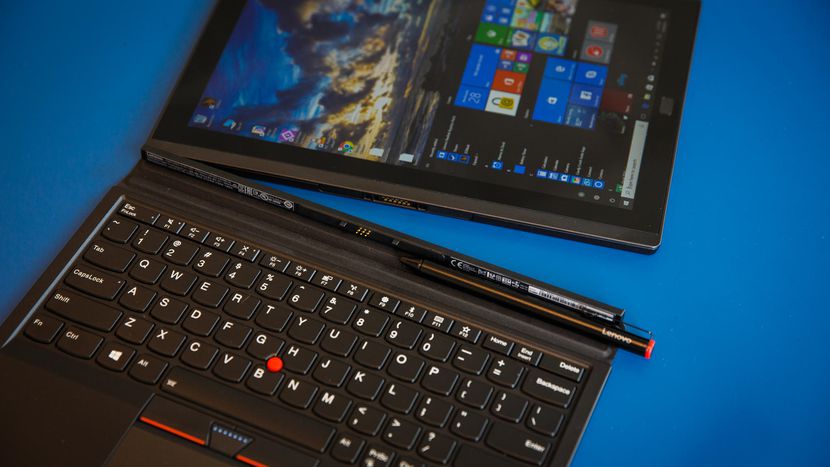
    This is the latest in the high-end ThinkPad X1 Tablet, which stands out by offering not only a standard keyboard cover, but also a series of modular add-ons, making this potentially a very flexible system. If flexible is what you want in a tablet, is it? read further then.

    The Design

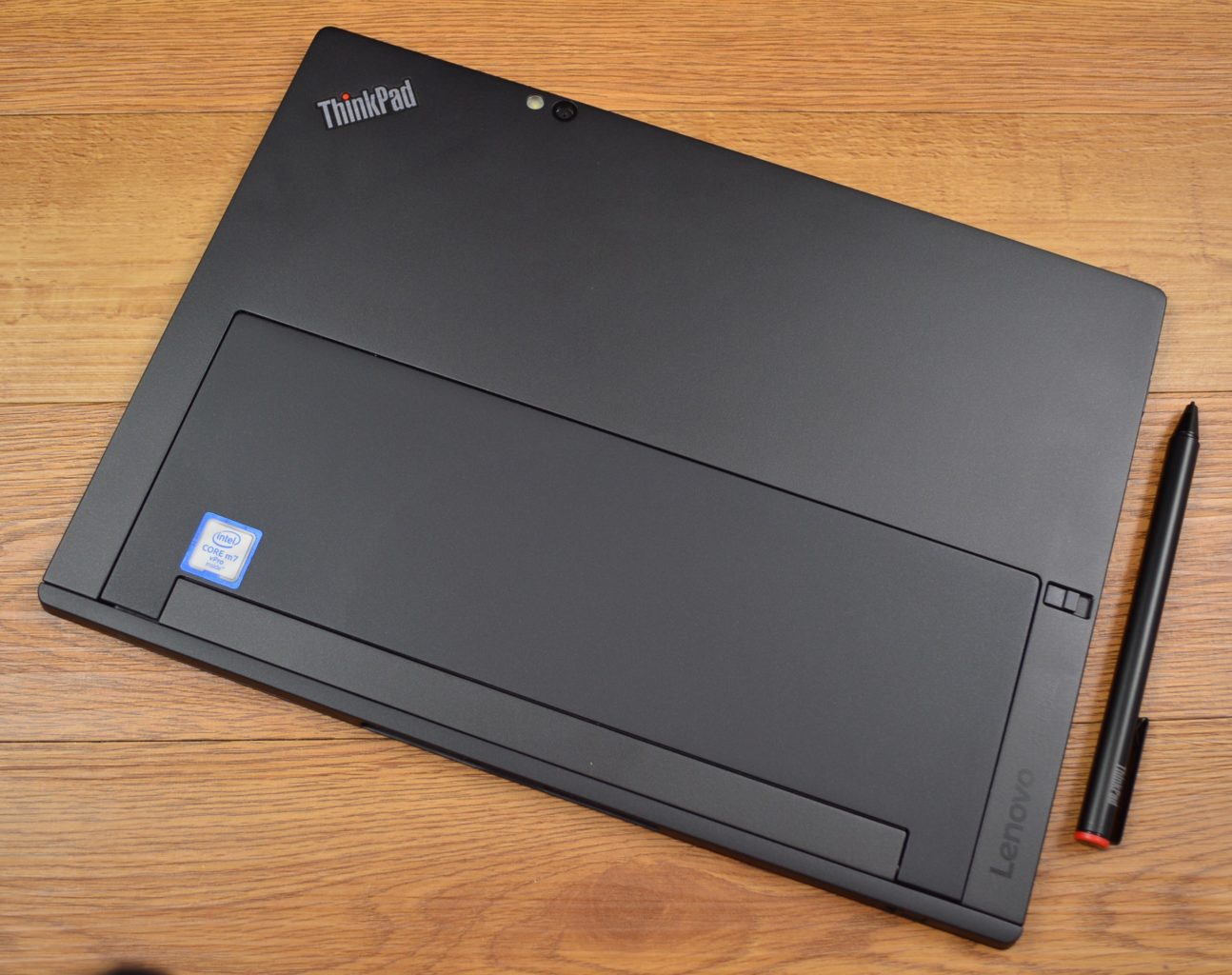
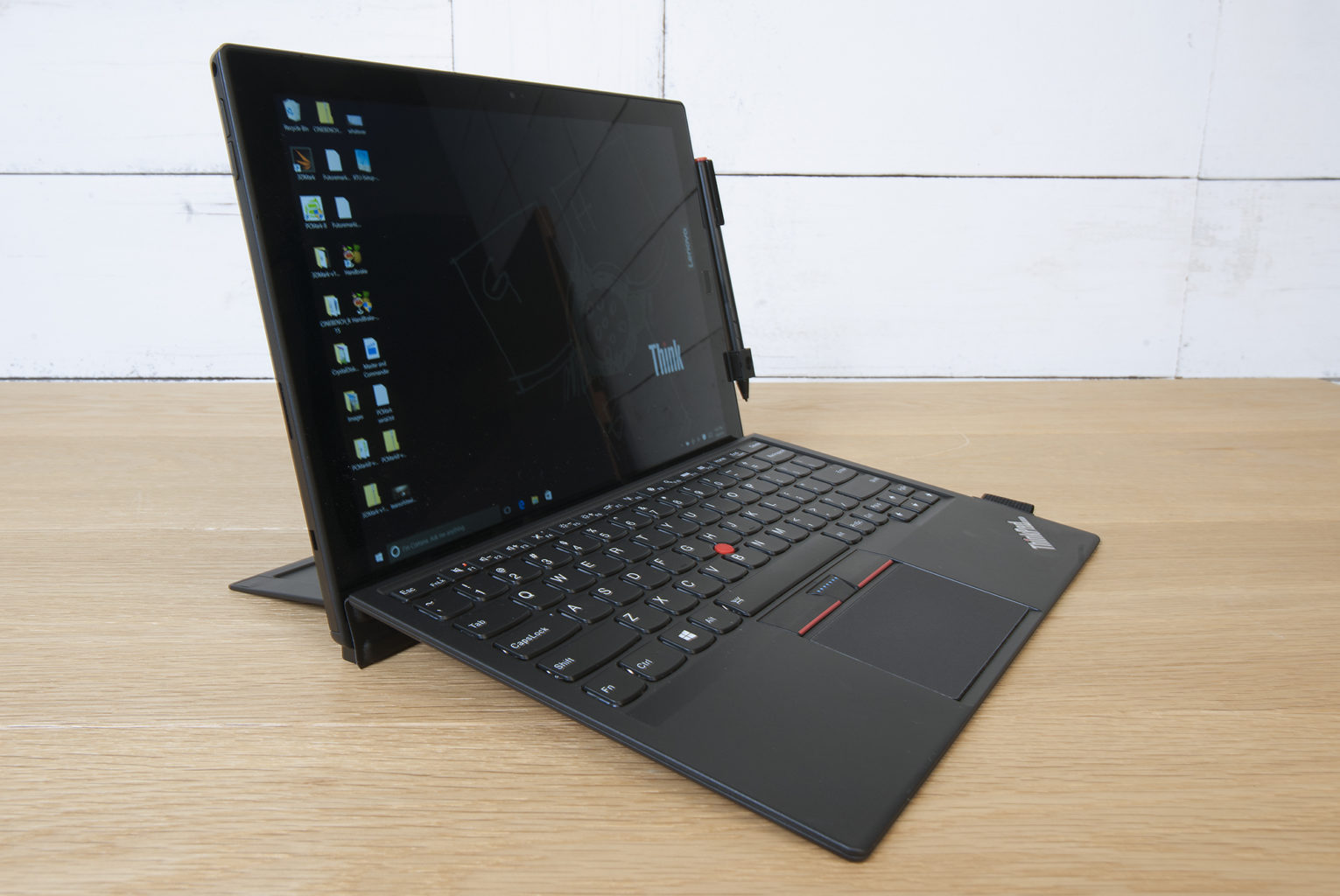
    The slim X1 Tablet shares a family resemblance with the rest of the ThinkPad line, thanks to its matte black finish, and the overall design of the tablet is unchanged from the 2016 model. The design is almost industrial, in matte black with sharp angles rather than smooth curves. Outwardly, it’s the same system, with a magnesium chassis, a durable business-rugged design and a built-in kickstand. It looks and feels great, no issues physically, its a stud. Lenovo is known for keyboards, and even in this attachable keyboard format, these keys are not too shallow. Lenovo has managed to create a small keyboard that works, and typing on it is a solid experience. The touchpad on here is a lot smaller, but you still get the familiar red trackpoint.

    The Display

    The 12-inch display is an IPS LED panel with a resolution of 2,160×1,440 pixels, which is essentially 2K. It provides a great viewing experience, one that stays vibrant with bright colors and shows good contrast. The image does not appear washed out from side angles, so theoretically you could share the display by watching Netflix with a few people.


    Quick Spec Look

    • Starting Price $1,599
    • CPU Up to 8th Gen Intel Core i7
    • RAM Up to 16GB
    • Storage Up to 1TB PCIe NVMe M.2
    • Display 13-inch, 3000 x 2000
    • Battery Life Up to 9.5 hours
    • Size 11.5 x 8.2 x 0.3 inches
    • Weight 1.9 pounds
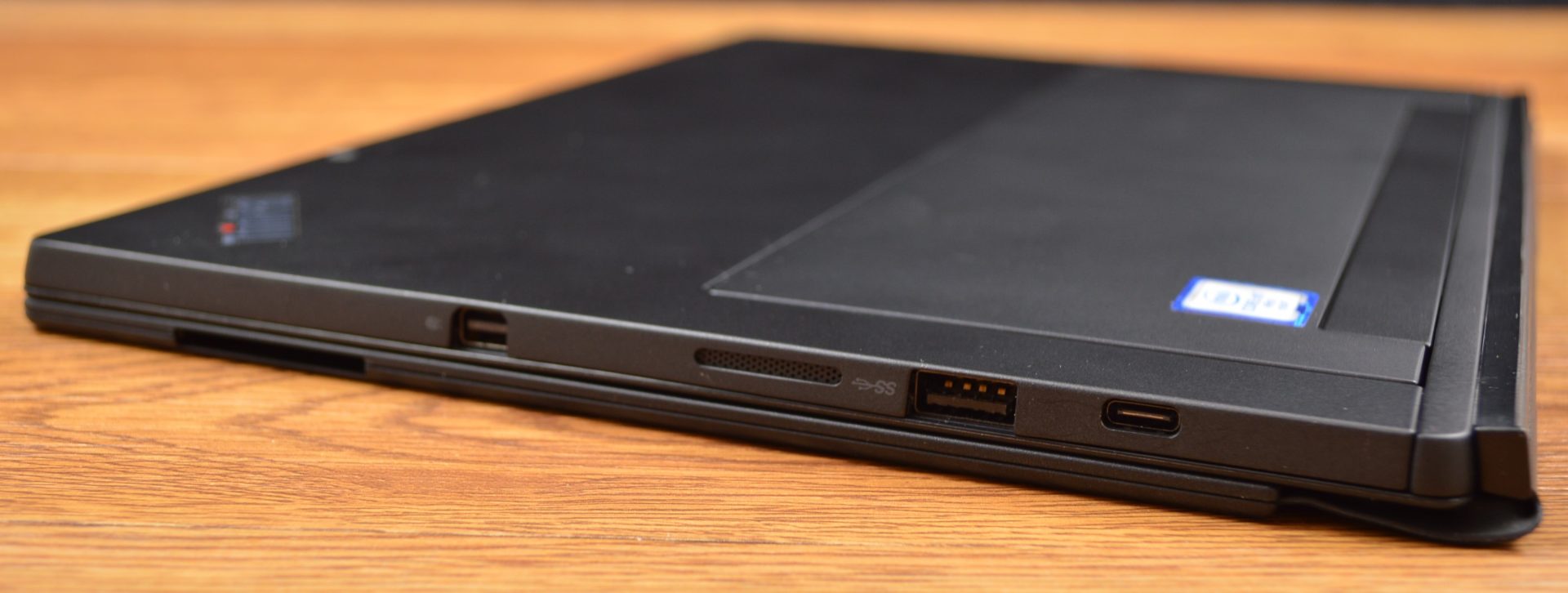
    • Ports Thunderbolt 3, SD card reader, Nano SIM, headphone


    The Final Thought

    It lacks side by side in every way next to the Microsoft surface, You can do better, Lenovo can do better, we will get better. For now if you like carrying around a lot of peripherals and add ons with what is supposed to be the grab and go computing gadget then please go right ahead and find the Lenovo Think pad Tablet x

  • Experience the Magic of Harry Potter on Your Phone

    Experience the Magic of Harry Potter on Your Phone

    Twenty years after the first book was published, the world of Harry Potter continues to grow and thrive. (And yes, I felt old typing that sentence.) This week, developer Jam City released the latest chapter in the saga, the mobile game Harry Potter: Hogwarts Mystery.

    Same School, New Story

    The game, available on both Android and iOS, does not actually feature everyone’s favorite boy wizard. The story is set about ten years before the events of the books, so while we see some familiar faces such as Dumbledore and Snape, the main cast of characters is entirely new. However, much of the dialogue is lifted directly from the books and films, so there’s a comforting sense of familiarity despite the new faces.

    You play a brand-new Hogwarts student whose brother was expelled from the school several years earlier. Through a series of quests and conversations with NPCs (non-player characters), you must try to unravel the mystery of why he was kicked out and what happened to him after he subsequently disappeared.

    Custom Characters

    The character creation screen is impressive for a mobile game. Similar to The Sims, you’re given a range of skin tones, features, and hairstyles to choose from. “It was super important to us, that all Harry Potter fans feel like they can create a character that looks like them, and know that they belong in Hogwarts,” Matt London of Jam City explained. “So everything from lip shape, to eyebrow shape, nose shape, all these things are adjustable.”

    Additional customizations and outfits are unlocked as you play or available for in-game currency. Like many free-to-play games, you can either purchase this currency for real money or accrue it through quest rewards.

    Simple Mechanics

    Despite the massive amount of work that went into designing the game—including a script of over 200,000 words and two years of intensive development and programming—the actual gameplay is very basic. You are guided through the world of wizardry by quest givers who want you to tap on highlighted objects or trace simple paths on your screen to cast “spells.”

    If you’re looking for a challenging game, Harry Potter: Hogwarts Mystery is not it. Kids can easily play and follow the story, but grown-up fans of the franchise may want to wait for the forthcoming augmented reality game from the makers of Pokémon GO.

  • Smart Paper May Soon Be Coming to a Store Near You

    Smart Paper May Soon Be Coming to a Store Near You

    Science fiction stories promised us a lot of things that have failed to materialize—flying cars, space vacations, and hoverboards that don’t spontaneously burst into flames. But researchers at Carnegie Mellon University may have found a way to make cheap, mass-produced “smart” paper a reality.

    From Analog to Digital

    There have been a few attempts already at translating printed or written materials to the digital world. Smart notebooks that can capture your pen strokes and apps that can save your doodles and handwritten notes are already available, but the Future Interfaces research team at Carnegie Mellon recently took things one step further. Their touch-sensitive paper can track pressure from a fingertip, pen or stylus, making it possible to easily digitize handwriting, drawings, and more.

    Just Like Real Paper, Only better

    “For paper to still be paper, our method had to be low cost,” the team spokesperson announced in a video released earlier this week.

    The research team wanted to use real, everyday paper as the basis for their product. Through trial and error, they crossed several methods and materials off their list, but finally they found two ways to make the smart paper function. Both use a carbon-based coating—one in the form of a pre-fabricated sheet that can be adhered to any surface, and the other a paint or spray that can be applied to rolls of paper during production.

    This makes it possible to create the paper in bulk—something the team wanted to ensure in order to make the product financially viable. With the current method, each sheet would cost around $.30, but the team hopes to find ways to lower the price.

    Limitless Applications

    Right now, individual sheets of paper with the special coating on the back can be attached to a sensor that converts pressure to real-time digital input. They hope that the technology can be used to create smart notebooks as well. Some other possibilities include interactive worksheets for students, board games, smart Post-It notes, and even interactive newspapers that allow you to share articles on social media.

    While it’s not quite ready for consumers, the researchers are confident that this is the first step toward making cheap, disposable smart paper a reality, stating, “We believe this illuminates one possible approach for achieving low-cost, interactive, paper-based experiences in the future.”